You’ve seen the demos. Someone opens Cursor, describes what they want in plain English, and watches production-quality code appear in their editor. Features built in minutes. Bugs fixed in seconds. It looks like the future of software development. For developers, it is.
Then you tried it. Or read more about it. And you realized something: Cursor is an AI coding assistant. It assists people who already know how to code. It doesn’t replace the knowledge. It amplifies it.
If you’re a non-technical founder searching for a cursor alternative because Cursor assumes skills you don’t have, you’re not alone. You’re not looking for a different coding assistant. You’re looking for a fundamentally different approach to building a product.
What Cursor Does (And Does Well)
Cursor is genuinely impressive technology. It deserves specific credit.
Code generation from natural language
Describe what you want in a comment or chat message, and Cursor generates the code. For experienced developers, this compresses hours of work into minutes. A function that would take 30 minutes to write, test, and debug gets generated in 60 seconds.
Codebase-aware suggestions
Cursor reads your entire project. Its suggestions reference your existing functions, follow your coding patterns, and integrate with your architecture. This isn’t generic code completion. It’s code completion that understands your specific codebase.
Multi-file editing
Cursor can make coordinated changes across multiple files simultaneously. Refactoring a function signature, updating all callers, and adjusting tests in one operation. For developers working on complex projects, this is a massive productivity gain.
Debugging assistance
Paste an error message. Cursor analyzes the stack trace, identifies the likely cause, and suggests a fix. Debugging that used to take hours of documentation and Stack Overflow now takes minutes.
For developers, the productivity gain is real
Senior engineers report 2-5x speed improvements with Cursor. That’s consistent across enough users to be credible. For someone who already understands software architecture, testing patterns, and deployment workflows, Cursor removes the tedious parts and lets them focus on decisions.
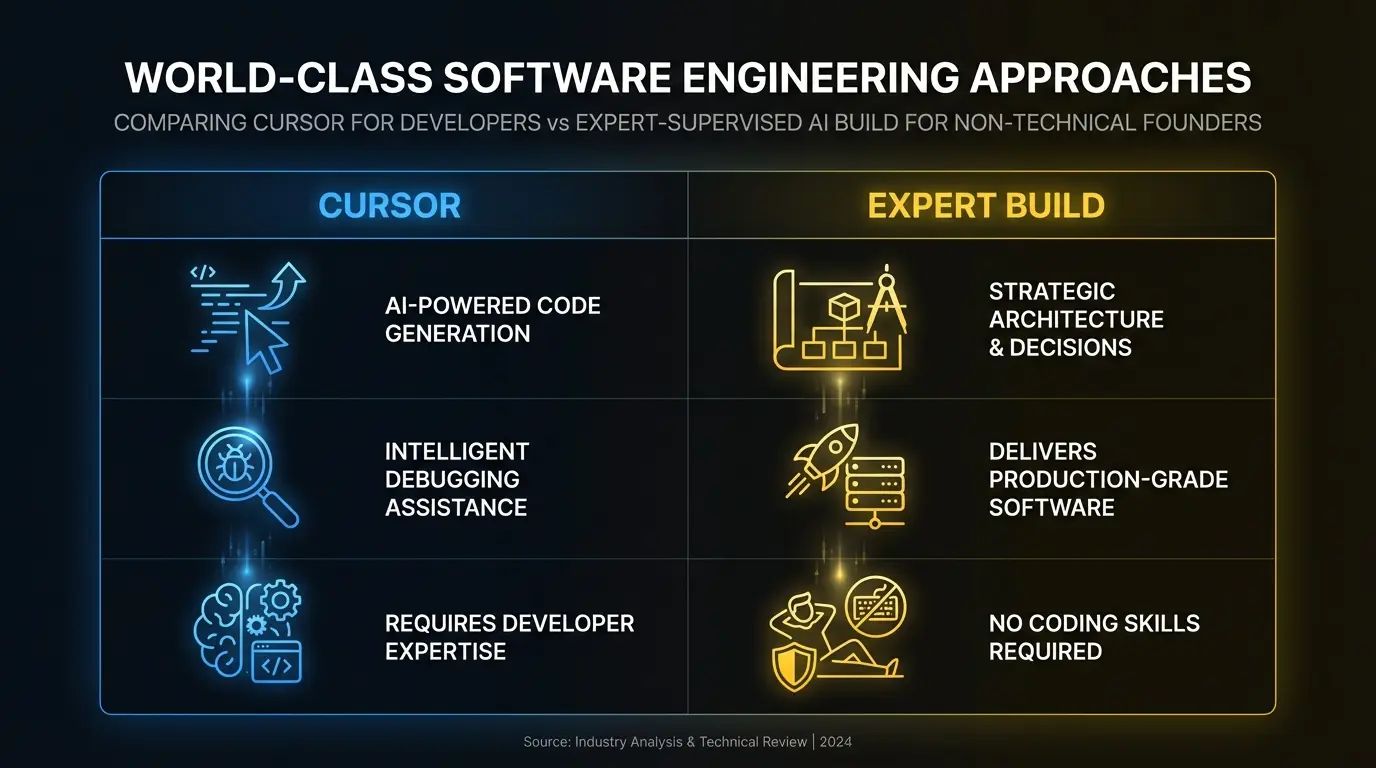
Who Cursor Is Actually For
Cursor’s sweet spot is clear: experienced developers who want to build faster.
Software engineers at companies use Cursor as their daily development environment. It replaces VS Code and adds AI capabilities on top.
Technical founders who can code but want to ship faster. Instead of writing every line, they describe features and let Cursor handle the implementation.
Freelance developers who can take on more clients because their per-project time drops significantly.
The common thread: these people already know how to evaluate code quality, design database schemas, implement security practices, handle edge cases, and deploy applications. Cursor makes them faster at the things they already know how to do.
The Non-Developer Reality
If you don’t have those skills, Cursor creates a specific set of problems.
You can generate code. You can’t evaluate it.
Cursor will write you a login system in 30 seconds. Is it secure? Does it hash passwords correctly? Does it handle session management properly? Does it prevent SQL injection? You don’t know. Cursor doesn’t flag these issues because it generates functional code, not necessarily secure code.
A developer using Cursor reviews the output. They know what to check. A non-developer accepts the output because they can’t distinguish good code from bad code.
You can build features. You can’t architect a product.
There’s a difference between “a collection of features that work individually” and “a product with a coherent architecture.” Cursor can build features. It can’t make the architectural decisions that determine whether your product scales, remains maintainable, or handles real-world usage patterns.
Database schema design. API structure. State management. Caching strategy. Error handling patterns. Authentication architecture. These are decisions, not code. They require engineering judgment that a coding assistant doesn’t provide.
You can fix bugs. You can’t prevent them.
Cursor helps you fix errors after they appear. But the architecture decisions that prevent entire categories of errors (proper type systems, input validation patterns, testing strategies, deployment safeguards) require understanding why errors happen, not just how to fix them.
The accumulation problem
Each feature you add with Cursor compounds the complexity of your codebase. Without architectural oversight, the codebase becomes increasingly fragile. Feature 10 breaks feature 3. A change in one file causes unexpected failures in another. The project reaches a point where adding anything new requires fixing everything else first.
Developers call this “technical debt.” For a non-developer using Cursor, it accumulates invisibly until the project becomes unmaintainable.
When a Coding Assistant Isn’t Enough
A coding assistant amplifies the user’s existing skills. If you bring strong engineering skills, you get strong engineering output faster. If you bring no engineering skills, you get unreliable output fast.
You’ve hit the limit of a coding assistant if:
You’re spending more time debugging than building. Each new feature introduces bugs in existing features, and the debugging cycle gets longer with each iteration.
You don’t know if your code is secure. You have a working product but no confidence that it handles authentication, data protection, or input validation properly.
You can’t deploy reliably. The product works on your machine but breaks in production. Or it works for one user but fails under concurrent usage.
You’re afraid to change anything. Every modification risks breaking something else. You’ve stopped adding features because the cost of regression is too high.
You’d need to hire a developer to take over anyway. The codebase has reached a point where you can’t maintain it yourself, and any developer who looks at it will recommend a rewrite.
If any of these sound familiar, you don’t need a better coding assistant. You need a different approach entirely.
What this looks like in practice
A non-technical founder uses Cursor to build a SaaS product over 3 weeks. The login works. The dashboard shows data. Payments go through in test mode. It looks like a product.
Then real users arrive. Someone enters a special character in a form field and the page crashes. Two users sign up with the same email and one account overwrites the other. The Stripe webhook fails silently and 3 customers are charged but their accounts aren’t upgraded. There’s no error logging, so the founder doesn’t even know these issues exist until customers complain.
These aren’t edge cases. They’re standard production scenarios that experienced engineers handle automatically and that coding assistants don’t flag because the code “works” in the technical sense.
The rebuild costs $25K-$40K. The original Cursor build cost $60 in subscription fees and 3 weeks of the founder’s time. The total cost of the “cheap” path: $25K-$40K plus 3 weeks wasted.
What You Actually Need Instead
As a non-technical founder, your goal isn’t to write code. It’s to have a product. The code is a means, not an end. Optimizing how you write code misses the point. The question is how you get from idea to production-grade product.
Three options make sense for non-technical founders:
Option 1: AI builder tools (for prototyping)
Tools like Bolt.new and Lovable don’t require coding skills at all. You describe what you want in natural language, and the tool generates a complete application. No editor. No code to evaluate.
The trade-off: the output is a prototype, not a production product. These tools are best for validating ideas before investing in a real build.
Option 2: Hire a developer who uses AI tools
Instead of using Cursor yourself, hire a developer who uses Cursor (or similar tools) in their workflow. They bring the engineering judgment. AI brings the speed. You get the quality of an experienced engineer at a lower cost and faster timeline than traditional development.
The trade-off: you still need to find, evaluate, and manage a developer. If you’ve ever hired a freelancer, you know this is non-trivial.
Option 3: Expert-supervised AI building
A team of senior engineers uses AI agents to build your product. You describe the outcome. They handle every technical decision. The AI handles code generation volume. The engineers handle architecture, security, quality, and judgment.
The trade-off: higher cost than a monthly subscription. But the output is a production-grade product, not a fragile codebase you can’t maintain.
Comparison: Cursor vs. Having It Built
| Factor | Cursor (You Use It) | Expert-Supervised Build |
|---|---|---|
| Who writes the code | You, assisted by AI | AI agents, supervised by senior engineers |
| Architecture decisions | You (no engineering training) | Senior engineers with 10+ years experience |
| Security | Whatever Cursor generates | Production-grade (auth, encryption, rate limiting) |
| Quality assurance | You review your own code | Code review by senior engineers + automated testing |
| Timeline | Weeks-months (learning + building) | Days-weeks |
| Cost | $20/mo + your time | Fixed project cost (outcome-based) |
| Production readiness | Low (prototype quality) | High (production-grade from day one) |
| Maintainability | Low (no architectural patterns) | High (clean architecture, documented, testable) |
| What you need to know | Coding fundamentals, at minimum | Just your product vision |
The core distinction: Cursor makes you a faster builder. Expert-supervised AI building makes building unnecessary. You describe the outcome and receive the product.
The Bottom Line
Cursor is one of the best AI coding tools available. For developers, it’s a genuine productivity revolution. Experienced engineers using Cursor ship faster, debug faster, and spend more time on decisions and less time on syntax.
For non-technical founders, Cursor is the wrong tool. Not because it’s bad, but because it’s designed for a different user. A coding assistant amplifies coding skills. If you don’t have coding skills, there’s nothing to amplify.
The cursor alternative that non-developers actually need isn’t a different coding tool. It’s a different model entirely: one where you describe the product and experts build it, using AI at a level that no non-developer can match.
Your idea doesn’t need you to learn to code. It needs experts who already know how, and who use AI to build at a speed that wasn’t possible two years ago.
Ready to build your product the right way? Talk to our team about getting from idea to production-grade product in weeks, not months.